
Seamless Tableau SSO Integration in Web Apps | Ellocent Labs

Discover How We Revolutionized SaaS Scalability—Unleashing Seamless Growth.

Revolutionizing Aviation

Seamless Tableau SSO Integration in Web Applications

Introduction

The Challenge We Faced

When our team at Ellocent Labs started building an analytics platform for one of our clients, we hit a wall that many product teams know all too well. They wanted private Tableau dashboards embedded seamlessly into their application, but every traditional SSO solution we looked at had the same annoying problem—users kept getting redirected to external login screens.

You know the drill: Microsoft login pages, Google sign-in popups, Okta screens. Sure, they're secure, but they completely break the flow of your application. One minute your user is in your beautifully designed interface, the next they're staring at a generic Microsoft blue screen.

For our client's product vision, this just wasn't going to cut it.

Challenge

What We Actually Needed

After several brainstorming sessions with our engineering team at Ellocent Labs, we laid out our must-haves:

No external login screens whatsoever: users should never leave our application
Complete control over the look and feel: every pixel should match the product's brand
True single-login experience: log in once, access everything including Tableau dashboards

This article walks through how we actually pulled this off using Auth0—but not in the way most people use it.

Challenge

Why We Ditched Traditional SSO

Here's the thing about standard SSO implementations: they're built around redirects. The whole architecture assumes users are okay with bouncing between different login screens. And maybe that works fine for internal tools where everyone's used to it.

But for a customer-facing product? It's a UX disaster.

Every time a user hits one of those redirect flows:

They lose context of what they were doing
Your carefully crafted branding disappears
The experience feels clunky and disconnected
You have zero control over that part of the journey

Our Ellocent Labs team decided to flip the script entirely. Instead of letting Auth0 control the authentication UI, we'd use it purely as an identity verification engine running quietly in the background. Everything the user sees and interacts with? That stays in our control.

Challenge

Our Solution Architecture

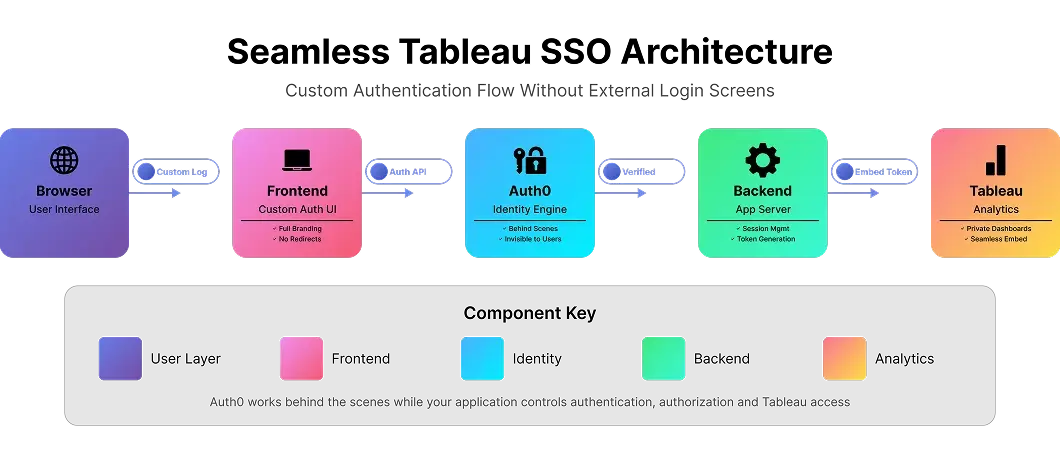
We built something that might seem counterintuitive at first—Auth0 is there, it's verifying identities, but it's completely invisible to end users. All the orchestration happens server-side.
Revolutionizing Aviation

Let me walk you through how the pieces actually fit together.

Solution

How We Built It (The Real Implementation)

1

STEP 1

Taking Control of the Login UI

The first thing we did was build our own login interface from scratch, embedded directly into the application. No Auth0 Universal Login, no hosted pages—just our own custom UI talking to Auth0's Authentication API in the background.

What this gave us:

Users never know Auth0 exists
Every interaction stays on-brand
No jarring redirects or context switching
Complete control over error messages and user feedback

When someone logs in, our frontend sends their credentials to our backend API. The backend then talks to Auth0 programmatically to verify those credentials. From the user's perspective, they're just logging into the application—nothing more, nothing less.

2

STEP 2

Managing Sessions Our Way

Once Auth0 confirms yep, that's a valid user, our backend takes over completely. We establish our own application sessions using JWTs with secure HTTP-only cookies.
Here's where it gets interesting: those Auth0 tokens? We don't pass them around, we don't store them in the frontend, we don't send them to Tableau. They exist for about two seconds on our backend just to verify identity, then they're gone.

Instead, we maintain our own session management where we:

Map the verified user to our internal roles and permissions
Control who can access what
Make all authorization decisions independently

This separation turned out to be crucial for security. Auth0 handles the "is this person who they say they are?" question. Everything else—the "what can they do?" part—that on us.

3

STEP 3

The Tableau Integration Piece

This is where things got tricky. Tableau dashboards are private by design, which is good! But we needed a way for authenticated users to see them without getting hit with another login prompt.
Our solution: server-to-server authentication with Tableau. Essentially, Tableau trusts our backend, and our backend vouches for users.
We ended up implementing this using Tableau Connected Apps (JWT-based approach). Other teams might use Trusted Authentication or REST API tokens depending on their setup—all of these work on the same principle.

The key insight: Tableau never talks directly to the end user. It only talks to our backend, which acts as a trusted middleman.

4

STEP 4

Embedding Dashboards Securely

Here's what happens when a user wants to view a Tableau dashboard:

On the backend (our server):

Check if the user's session is still valid
Verify they actually have permission to see this specific dashboard
Apply any row-level security rules based on their role
Generate a short-lived Tableau token (usually expires in 5-10 minutes)
Create a scoped embed URL that only works for this user and this dashboard
Send that URL back to the frontend

On the frontend (user's browser):

Request the embed URL from our backend
Use Tableau's Embedding API to render the dashboard
Handle token refresh automatically when needed
Never touch, store, or see any actual credentials

The result: Users click on a dashboard link and it just... loads. No prompts, no waiting, no authentication friction. Just works.

Challenge

Security Was Our Top Priority

Look, we're not going to pretend security was an afterthought we bolted on later. From day one at Ellocent Labs, we knew this architecture had to be bulletproof. Here's how we locked it down:

Keeping Secrets Where They Belong
All the sensitive stuff—Tableau secrets, authentication logic, token generation—lives exclusively on the backend. The frontend only ever gets time-limited URLs that are already scoped to specific users and dashboards. Even if someone intercepts one of these URLs, it's basically useless to anyone else.
Short-Lived Tokens
Every Tableau token we generate expires quickly, typically after 5-10 minutes. Our backend handles refresh automatically in the background, so users never notice. But if a token somehow leaks? It's already expired or about to be.
Defense in Depth
We validate everything server-side before generating any tokens. User permissions get checked against our internal authorization model. Even if someone bypasses the frontend somehow (which they shouldn't be able to), they'll hit a wall at the backend.
Principle of Least Privilege
Users only see dashboards they're explicitly allowed to access. We enforce row-level security dynamically based on their role. If you're only supposed to see data for the East region, that filter gets applied at query time—there's no way to bypass it from the frontend.
Encrypted Everything
HTTPS/TLS everywhere, no exceptions. Every connection—frontend to backend, backend to Auth0, backend to Tableau—is encrypted. We also implemented HSTS headers to prevent any protocol downgrade attacks.
Minimal Attack Surface
By using Auth0 only for identity verification and handling everything else ourselves, we actually reduced the number of potential attack vectors. There's a clear separation of concerns, which makes the whole system easier to audit and secure.
Challenge

What This Actually Achieved for Us

After rolling this out, the difference was night and day:

For Users: They log in once and everything just works. Dashboards load as fast as any other page in the application. No confusing redirects, no "wait, where am I now?" moments. Just a smooth, consistent experience.
For Our Development Team: We own the entire authentication flow. Need to add a new feature? No problem—we're not constrained by a third-party login screen. Debugging issues? Way easier when you control all the moving parts. Plus, fewer external dependencies means fewer things that can break.
For Security and Compliance: We have complete visibility into who accessed what and when. Permission management is centralized. And we can implement fine-grained access controls that would be impossible with standard SSO flows.
For Operations: Honestly, this has been simpler to maintain than we expected. Fewer integration points mean fewer things to monitor. Error handling is straightforward because we control the whole flow. And it scales naturally as the application grows.
Challenge

When You Probably Shouldn't Do This

Real talk: this approach isn't right for every situation. We've seen cases where traditional SSO makes more sense:

Enterprise federation requirements: If you're selling to large enterprises that need to use their own identity providers (Azure AD, Okta, etc.), you'll want standard SAML/OIDC integration.
Corporate IT mandates: Some organizations have strict policies about authentication protocols. If they require specific federation standards, you've got to comply.
Cross-application SSO: If users need to access multiple independent applications with a single login, traditional SSO federation is built for exactly that.
Limited customization needs: If the standard login experience works fine for your use case, there's no reason to build something custom.

In those scenarios, the benefits of federated identity outweigh the UX limitations we were trying to solve.

Challenge

Key Lessons from Building This

After implementing this architecture at Ellocent Labs, here's what really matters:

Separation of concerns is your friend. Using Auth0 only for identity verification while controlling everything else ourselves gave us the best of both worlds—robust identity management without giving up control.
Security and UX aren't opposites. We achieved enterprise-grade security while actually improving the user experience. You don't have to choose.
The backend is your security boundary. Never trust the frontend with anything sensitive. All critical decisions happen server-side.
Users shouldn't think about authentication. If they notice your authentication flow, something's wrong. The goal is for it to be invisible.
Challenge

Things to Consider Before Building This

If you're thinking about implementing something similar, here are some real considerations from our experience:

Backend infrastructure matters: You need solid session management and token handling. This isn't something you can half-ass.
Token refresh logic: Implement this carefully. Users should never see a token expiration error.
Error handling: Auth0 or Tableau will have hiccups. Your application needs to handle those gracefully without breaking the user experience.
Monitoring: Set up proper tracking for authentication metrics and token usage. You want to catch issues before users do.
Compliance requirements: Make sure your session management approach meets whatever regulatory requirements apply to your industry.
Conclusion

Wrapping Up

When we started this project at Ellocent Labs, we knew there had to be a better way than forcing users through external login screens. What we ended up building proved that you really can have both great security and great user experience.

The architecture we created feels invisible to users, stays completely under our control, and maintains enterprise-grade security standards. That's exactly what embedded analytics should be—a seamless part of your application, not something bolted on that feels like a separate tool.

By rethinking how we use Auth0 and integrate with Tableau, we eliminated the false choice between security and user experience. And honestly, that's made all the difference for our clients.

Schedule a 15-Minutes call

Let’s make things happen and take the first step toward success!

Got Ideas? We’ve Got The Skills.
Let’s Team Up!

What Happens Next?

1

We review your request, contact you, and sign an NDA for confidentiality.

2

We analyze your needs and create a project proposal with scope, team, time, and cost details. 

3

We schedule a meeting to discuss the offer and finalize the details.

4

The contract is signed, and we start working on your project immediately.

Talk to Our Experts