A Beginner’s Guide to CI/CD Pipelines: Benefits, Best Practices & Tools
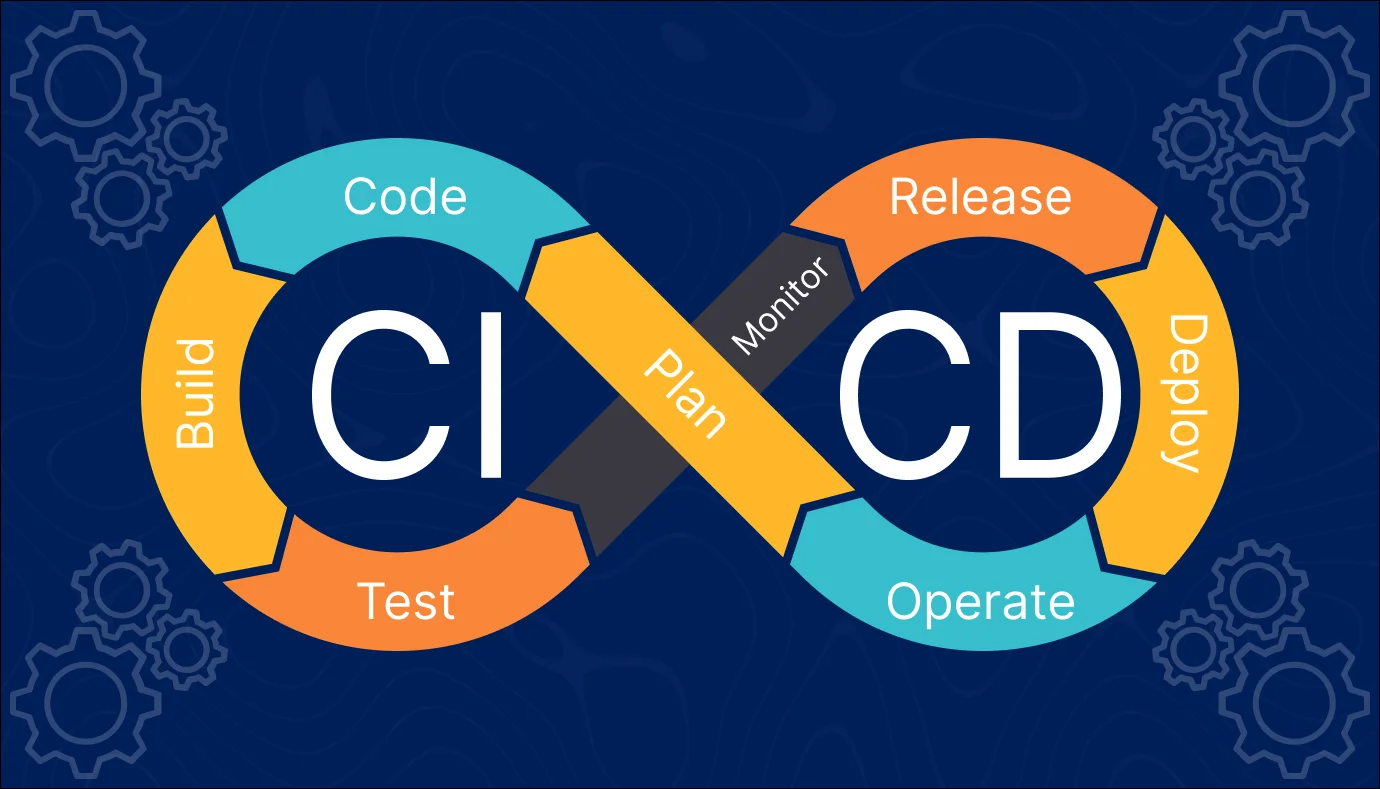
The CI/CD pipeline introduces automation and continuous monitoring throughout the entire software lifecycle, from integration and testing to delivery and deployment. These interconnected practices together form a robust CI/CD pipeline guide for modern software development.
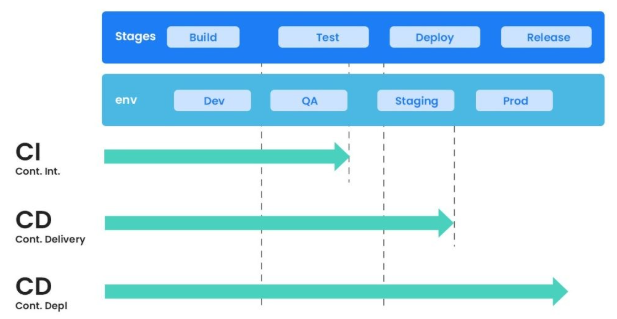
Continuous integration tutorial concepts focus on a development approach where team members integrate their code at least once a day. Each integration is verified through automated builds and tests to quickly detect errors.
Continuous delivery is a software engineering practice in which teams develop software in short cycles, ensuring that applications can be reliably released at any time.
Continuous deployment takes this a step further by automatically deploying every validated change to production. This form of DevOps automation enables faster feedback, helps testers verify stability, and ensures code changes are production-ready.
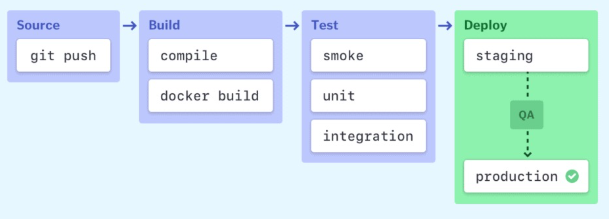
Stages of a CI/CD pipeline
CI/CD pipeline Best Practices
Here is a CI/CD pipeline best practices:
- Write up the current development process therefore, you can know the procedures that require to change and one that can be easily automated.
- Start off with a small proof of project before going ahead and complete whole development process at once.
- Set up a pipeline with more than one stage in which fast fundamental tests run first.
- Start each workflow from the same, clean, and isolated environment.
- Run open source tools that cover everything from code style to security scanning.
- Setup a better code hub to continuously check the quality of your code by running the standard set of tests against every branch.
- Peer code review each pull request to solve a problem in a collaborative manner.
- You have to define success metrics before you start the transition to CD automation. This will help you to consistently analyze your software, developing progress help refining where needed.
Advantages of CI/CD pipelines
Here are the pros/ benefits of CI/CD Pipeline:
- Builds and testing can be easily performed manually.
- It can improve the consistency and quality of code.
- Improves flexibility and has the ability to ship new functionalities.
- CI/CD pipeline can streamline communication.
- It can automate the process of software delivery.
- Helps you to achieve faster customer feedback.
- CI/CD pipeline helps you to increase your product visibility.
- It enables you to remove manual errors.
- Reduces costs and labour.
- CI/CD pipelines can make the software development lifecycle faster.
- It has automated pipeline deployment.
- A CD pipeline gives a rapid feedback loop starting from developer to client.
- Improves communications between organization employees.
- It enables developers to know which changes in the build can turn to the brokerage and to avoid them in the future.
- The automated tests, along with few manual test runs, help to fix any issues that may arise.
Important CI/CD tools
- Jenkins
- Circle CI
- Gitlab CI
- Github Action
- Bitbucket Pipeline
- AWS Code Pipeline
- Google CloudBuild
- Bamboo
Conclusion:
CI/CD pipelines are transformational for development teams. Automating crucial processes reduces the effort required to generate, test, and release code, making the process go more smoothly and quickly. With fewer manual errors and faster feedback, teams can concentrate more on innovation and less on firefighting. CI/CD helps your team stay in sync, maintain high quality, and provide value to users more confidently and consistently, regardless of the size of the project—from minor updates to major releases.
Related Blogs
Schedule a 15-Minutes call
Let’s make things happen and take the first step toward success!
Got Ideas? We’ve Got The Skills.
Let’s Team Up!
Let’s Team Up!
What Happens Next?
We review your request, contact you, and sign an NDA for confidentiality.
We analyze your needs and create a project proposal with scope, team, time, and cost details.
We schedule a meeting to discuss the offer and finalize the details.
The contract is signed, and we start working on your project immediately.