How to Automate Invoice Processing with AI: An End-to-End Enterprise Guide (2026)
Listen to this article
A practitioner’s guide to implementing AI invoice processing automation — what the technology actually does at each step, a 6-week pilot plan, real cost numbers, and the one failure mode most vendors will not warn you about.
AI invoice processing works by combining OCR (to read invoice documents), NLP (to understand what each field means), and machine learning (to improve accuracy over time and match against purchase orders). The result is a system that captures invoice data, validates it against your ERP, routes it for approval based on your rules, and posts it automatically — reducing per-invoice cost from an average of $15.97 manually to $2.36 at scale, according to Ardent Partners 2025 benchmarks.
About the Author
This post is written by the AI automation team at Ellocent Labs IT Solutions, with direct production experience building AI invoice processing pipelines for healthcare, fintech, and enterprise clients across the UK, Australia, and North America. Where we cite data, we link to the source.
This post is written by the AI automation team at Ellocent Labs IT Solutions, with direct production experience building AI invoice processing pipelines for healthcare, fintech, and enterprise clients across the UK, Australia, and North America. Where we cite data, we link to the source.
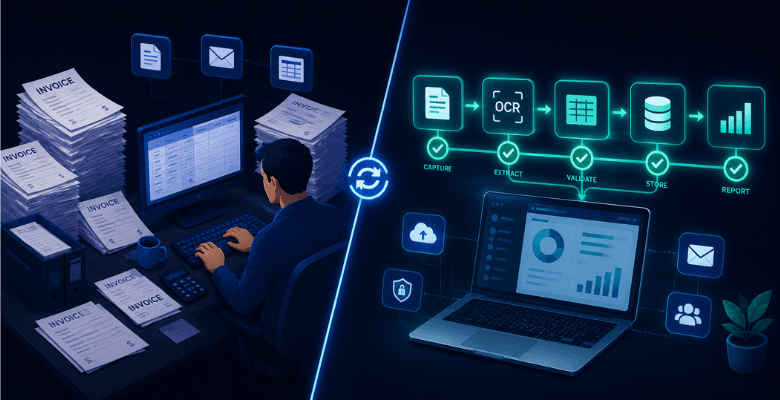
Your accounts payable team is processing invoices the same way they did in 2015. Manually keying data, chasing approvals over email, and hoping nobody missed a duplicate payment. Meanwhile, the cost per invoice sits at $15.97 — and 68% of finance teams are still manually entering invoice data into their ERP in 2026.
The same workflow that takes a human 10–30 minutes per invoice takes an AI-powered system 1–2 seconds. At scale, that is not an efficiency gain. It is a structural cost advantage your competitors are already exploiting.
This guide covers exactly how to automate invoice processing with AI — what the technology actually does at each step, how to implement it without derailing your AP team, what it genuinely costs, and the one failure mode most vendors will not warn you about.
What Is AI Invoice Processing Automation?
AI invoice processing automation is the use of artificial intelligence, machine learning, and optical character recognition (OCR) to capture, extract, validate, match, and route invoices through approval workflows — without manual data entry at any step.
The critical distinction from older rule-based automation: AI-powered systems handle varied invoice formats without requiring a separate template for each supplier. A vendor can change their invoice layout, submit in a different currency, or send a partially scanned PDF — and a properly built AI system handles it by inference, the same way an experienced AP coordinator would, then flags genuinely ambiguous cases for human review.
Why Manual Invoice Processing Is a Bigger Problem Than Most CFOs Admit
The visible cost of manual AP is easy to calculate: staff time multiplied by invoice volume. The invisible costs are what actually kill you.
Duplicate payments are the most expensive. When invoices arrive through multiple channels — email, supplier portal, post — and a team is working through a backlog, the same invoice gets processed twice. The average enterprise loses between 0.1% and 0.5% of spend annually to duplicate payments and overpayments. On $50 million in annual payables, that is $50,000–$250,000 walking out the door undetected.
Missed early payment discounts are the second invisible cost. Most suppliers offer a 1–2% discount for payment within 10 days (2/10 net 30 terms). When your manual AP cycle takes 5–10 business days just to get an invoice approved, you never capture that discount. At scale, the foregone discount value routinely exceeds the cost of an automation platform by a factor of three.
Audit exposure is the third. When a regulator or auditor asks why a specific payment was approved, “the AP team checked it” is not a sufficient answer in a GDPR, HIPAA, or Australian Privacy Act environment. You need a tamper-evident audit trail showing who reviewed what, when, and why — and manual processes almost never produce one.
From our client work: In an engagement with a UK healthcare client, a backlog of 4,000 supplier invoices had accumulated over a quarterly close period. Three were duplicates. Two had been approved by the wrong cost centre. None had a clear audit trail. The compliance remediation cost more than the invoice automation system we subsequently built.
How AI Invoice Processing Works — Step by Step
Understanding the mechanics matters when you are evaluating platforms or deciding whether to build a custom pipeline.
-
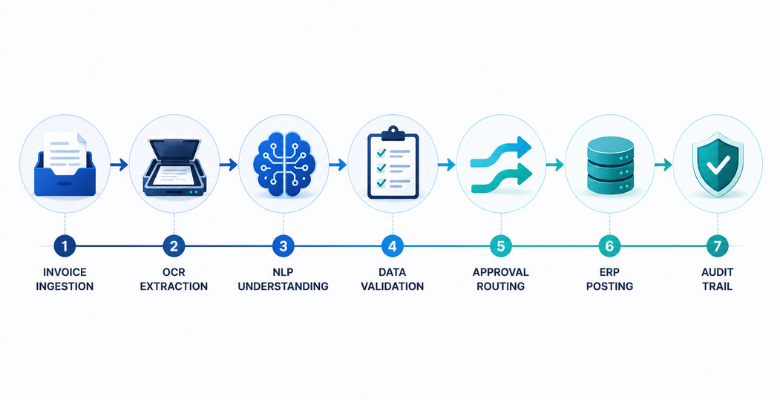
Invoice Ingestion. Invoices arrive through multiple channels simultaneously: email attachments, supplier portals, EDI feeds, shared network folders, and occasionally paper scans. A production-grade AI system monitors all of these sources automatically and pulls invoices into a unified processing queue without requiring AP staff to download, rename, or forward files.
-
OCR Extraction. The OCR layer reads the invoice document — PDF, scanned image, or photo — and converts it into machine-readable text. Modern AI-powered OCR handles varied layouts, fonts, languages, and scan quality without requiring fixed coordinate-based templates. It extracts: vendor name, invoice number, invoice date, due date, line items, unit prices, totals, tax amounts, and purchase order reference.
-
NLP Classification. Natural Language Processing interprets what the extracted text actually means. It identifies which fields are which, even when vendors label them differently — “Invoice No.”, “Bill Number”, “Tax Invoice Reference” all map to the same field. NLP also reads line-item descriptions and assigns general ledger codes based on your predefined rules or learned historical patterns.
-
Validation and Matching. The system validates the extracted data against your ERP. Two-way matching compares the invoice against the purchase order (quantities, unit prices, vendor). Three-way matching adds confirmation of goods receipt. Mismatches, missing PO references, potential duplicates, and amounts above approval thresholds are flagged automatically for human review. Clean invoices pass through without touching a human at all.
-
Approval Routing. Based on your pre-configured rules — invoice amount, department, vendor category, cost centre — the system routes invoices to the correct approver. Low-value invoices from trusted vendors auto-approve and post directly. Higher-value invoices route to managers or finance leads with a single-click approve/reject interface. The system logs every action with a timestamp.
-
ERP Posting and Payment. Once approved, invoice data pushes directly into your accounting system or ERP — SAP, Oracle, NetSuite, Xero, QuickBooks — with line items, GL codes, and payment details mapped correctly. AP staff no longer re-enter data. Reconciliation errors downstream drop significantly.
-
Audit Trail and Reporting. Every step creates a permanent, timestamped record: who processed it, what the AI extracted, what matched and what did not, who approved, and when payment was triggered. This audit trail is automatically available for compliance review, month-end close, and external audit — without anyone building a spreadsheet.
The Technology Stack Behind AI Invoice Processing
Most vendor marketing conflates four distinct technologies. Knowing the difference matters when you are evaluating build vs. buy.
OCR (Optical Character Recognition) converts invoice images into machine-readable text. Legacy OCR relied on fixed templates — the system expected the invoice total in a specific position. Modern AI-powered OCR uses trained models that handle any layout.
NLP (Natural Language Processing) understands context. It distinguishes between a “date” that is the invoice date and a “date” that is the delivery date, reads descriptions to assign GL codes, and identifies vendor names across varied formatting.
Machine Learning improves accuracy over time. The system learns from every invoice it processes — when an AP staff member corrects a field mapping, the model incorporates that correction and applies it to future invoices from the same vendor. Accuracy typically improves from 85–90% at deployment to 95%+ within 60–90 days of live operation.
Workflow Automation is the orchestration layer — routing rules, approval hierarchies, ERP connectors, and exception handling. Platforms like Tipalti, Coupa, and Basware include their own workflow engines. Custom builds using n8n, Python, and direct ERP APIs give you full control over the logic but require development investment.
SaaS Platform vs. Custom-Built AI Pipeline — Which One Is Right for You?
The honest answer depends on two variables: invoice volume and ERP complexity. Most enterprises with standard ERP setups (SAP, Oracle, NetSuite) and straightforward approval hierarchies are better served by a proven SaaS platform than a custom build. The cost-to-value ratio is hard to beat. Custom pipelines make sense when you have proprietary legacy systems that no SaaS platform integrates with cleanly, specific data residency requirements (Australian Privacy Act, GDPR data sovereignty), or compliance requirements that require air-gapped infrastructure.
| Factor | SaaS Platform | Custom AI Pipeline |
|---|---|---|
| Implementation time | 6–12 weeks | 8–16 weeks |
| Upfront cost | Low — subscription model | $30,000–$120,000 build cost |
| Ongoing cost | $500–$5,000/month | Infrastructure + maintenance |
| ERP integration | Standard connectors | Fully custom — any system |
| Data residency control | Limited — vendor’s infrastructure | Full — your infrastructure |
| Compliance (HIPAA, GDPR) | Depends on vendor certifications | Configurable to your requirements |
| Custom approval logic | Configurable within platform limits | Unlimited |
| Best for | Standard AP workflows, 200–5,000 invoices/month | Complex legacy systems, regulated industries, 5,000+ invoices/month |
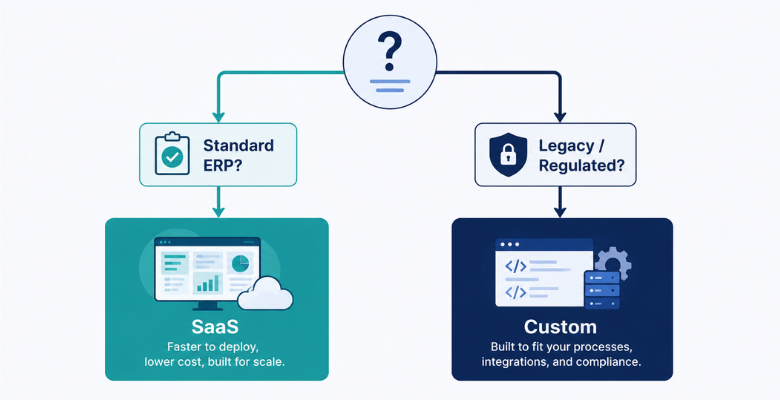
At Ellocent Labs, we have built both. Our recommendation for most clients: start with a SaaS platform to prove ROI, then migrate to a custom-built AI pipeline if you hit the platform’s ceiling — the same hybrid logic that applies to software development in general.
The Failure Mode Nobody Warns You About
Here is the uncomfortable truth most invoice automation vendors skip in their sales process.
An AI invoice processing system will handle 95–98% of your invoices correctly and automatically. The remaining 2–5% — the exceptions — are where the real risk lives.
An agent handling invoice processing might successfully complete 2,400 invoices and then, on the 2,401st, misinterpret an edge-case currency symbol, infer a wrong subtask sequence, and silently write an incorrect value into your ERP — with no exception thrown and no alert fired. We described this failure pattern in detail in our post on building autonomous AI agents for enterprise workflows, and it applies directly to invoice automation.
The solution is not to avoid automation. It is to design your exception handling before you design your automation. Every production invoice automation deployment needs three things:
A confidence threshold. Set a minimum confidence score below which the AI does not auto-post — it flags for human review instead. Start conservative (85% confidence required for auto-posting) and raise it as the model proves itself on your invoice data.
A human review interface that is fast. Exceptions that require human review should reach the right person in under two minutes and take under 30 seconds to approve or correct. If exception handling is slow or unclear, AP staff will route everything manually — defeating the purpose of the automation.
A tamper-evident audit log that includes the AI’s reasoning. When a regulator asks why invoice 2,401 was posted with an incorrect amount, “the AI decided” is not an acceptable answer. Your audit log must capture what the system extracted, what confidence level it assigned, and what triggered the exception — alongside the human action that resolved it.
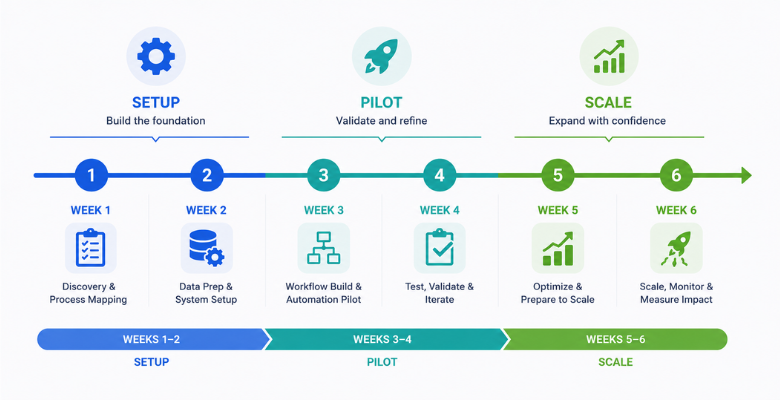
How to Implement AI Invoice Processing — A 6-Week Pilot Plan
Before you start: Establish your baseline metrics now. Cost per invoice (total AP staff cost ÷ monthly invoice volume), average processing time from receipt to payment, current error rate, and early payment discount capture rate. You need these numbers to prove ROI — and to know which vendor claims to believe.
-
Week 1 — Baseline and Vendor Selection. Pull 3 months of invoice data. Count volume, format variety, and the percentage that required manual correction. Identify your top 20 vendors by volume — these will be your pilot cohort. Shortlist 2–3 platforms or assess custom build feasibility based on your ERP environment.
-
Week 2 — Integration and Configuration. Connect the platform to your ERP. Configure vendor master data (the AI needs clean vendor records to match against). Set your approval hierarchy rules. Define confidence thresholds for auto-posting vs. human review.
-
Week 3 — Pilot with Top 20 Vendors. Process invoices from your top 20 vendors through the new system in parallel with your existing manual process. Do not auto-post yet — review every AI decision and correct where needed. This is model training in disguise.
-
Week 4 — Enable Auto-Posting for Clean Invoice Types. Enable straight-through processing for invoice types where confidence is consistently above threshold. Keep complex multi-line, multi-currency, or regulated invoices in supervised mode.
-
Week 5 — Expand Vendor Cohort. Roll out to your next 50 highest-volume vendors. By now, model accuracy should be measurably improving. Monitor exception rate — it should be falling.
-
Week 6 — Measure and Decide. Calculate your new cost per invoice, processing time, and error rate. Compare to baseline. Ardent Partners benchmarks show AI automation reduces per-invoice processing cost by 85% on average. At 1,000 invoices per month and a baseline cost of $15.97, that is $13,600 per month in direct cost savings — before early payment discounts.
What Does AI Invoice Processing Actually Cost?
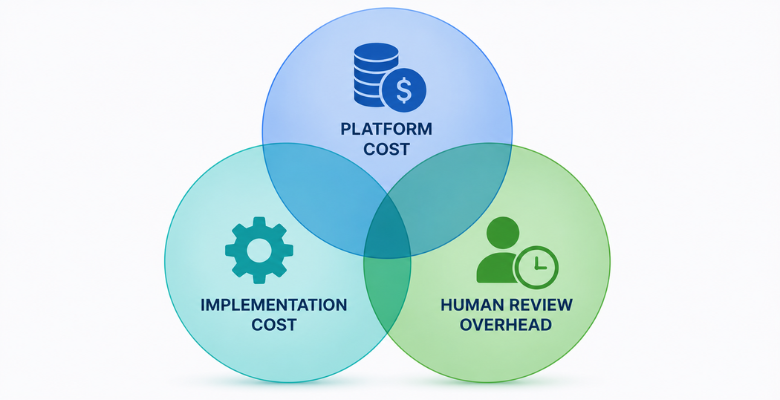
Three cost buckets matter. Most vendors only quote you the first one.
Platform or build cost: SaaS platforms range from $500–$5,000 per month depending on volume and features. A custom-built pipeline costs $30,000–$120,000 to build, then $500–$2,000/month in infrastructure and maintenance.
Implementation cost: Even SaaS platforms require configuration, ERP integration, and AP team training. Budget $5,000–$25,000 for professional services in complex ERP environments.
Human review overhead: Budget 15–20 minutes of AP staff time per 100 invoices in your first quarter. This decreases as accuracy improves — but it does not go to zero. Design your exception workflow before deployment, not after.
| Cost Element | Year 1 | Year 2 |
|---|---|---|
| Platform / infrastructure | $12,000–$36,000 | $12,000–$36,000 |
| Implementation | $10,000–$25,000 | $0 |
| Human review overhead | $8,000–$15,000 | $3,000–$6,000 |
| Total | $30,000–$76,000 | $15,000–$42,000 |
| Cost savings vs. manual | $130,000–$160,000 | $150,000–$180,000 |
The ROI is not close. The question is not whether to automate. It is which approach fits your current ERP environment. Our AI-powered automation team includes detailed cost modelling in every engagement before a single line of code is written.
Frequently Asked Questions
How accurate is AI invoice processing?
Leading platforms achieve 95%+ data extraction accuracy on standard invoice formats within 60–90 days of live operation. Initial accuracy at deployment is typically 85–90%, improving as the ML model learns from your specific vendor invoice formats and AP team corrections.
Can AI invoice processing handle invoices in multiple currencies and languages?
Yes, most enterprise-grade platforms support multi-currency and multi-language extraction. Accuracy varies by language — English, German, French, and Spanish achieve the highest accuracy rates. Always test with your actual vendor invoice sample before committing to a platform.
Does AI invoice processing integrate with SAP, Oracle, and NetSuite?
The major SaaS platforms (Tipalti, Coupa, Basware, Rillion) have pre-built connectors for SAP, Oracle, NetSuite, and most major ERPs. Custom-built pipelines can integrate with any system via API, but require development work for each integration point.
How long does implementation take?
Standard SaaS deployments take 6–12 weeks from contract to live processing. Mid-market organisations with complex approval hierarchies typically take 8–16 weeks. Custom-built pipelines on legacy systems can take 12–20 weeks. Starting with a pilot cohort of your top 20 vendors significantly reduces initial implementation risk.
Is AI invoice processing compliant with GDPR, HIPAA, and the Australian Privacy Act?
Compliance depends on how you deploy, not just which platform you choose. Your invoice data processed through a SaaS vendor’s infrastructure may not satisfy Australian Privacy Act data residency requirements or HIPAA’s Business Associate Agreement requirements. If you operate in a regulated industry, confirm data residency, encryption standards, and BAA availability with any vendor before procurement — or consider a custom pipeline on your own infrastructure where you control data handling completely.
The Bottom Line
Manual invoice processing is not just slow — it is structurally expensive in ways that do not show up clearly on a cost centre report until a compliance event, a duplicate payment discovery, or a month-end close disaster makes them visible all at once.
AI invoice processing automation eliminates the manual data entry, speeds the approval cycle from days to hours, captures the early payment discounts your current cycle misses, and produces an audit trail that meets modern compliance requirements automatically.
The three things you need to get right before anything else: establish your baseline metrics, design your exception handling workflow, and choose between SaaS platform and custom pipeline based on your ERP environment and data residency requirements — not based on which vendor has the best demo.
If you are evaluating whether a custom-built AI invoice processing pipeline is the right approach for your environment — particularly if you operate in healthcare, fintech, or any other regulated sector across Australia, the UK, or North America — our AI automation team at Ellocent Labs has built production invoice automation for clients in exactly those environments. We will tell you honestly whether a SaaS platform gets you there faster, or whether your specific compliance and integration requirements need a custom build.
Evaluating AI Invoice Automation for Your Business? We’ve Built It in Production.
Ellocent Labs has built production invoice automation pipelines for healthcare, fintech, and enterprise clients across the UK, Australia, and North America. We will tell you honestly whether a SaaS platform gets you there faster, or whether your compliance and integration requirements need a custom build.
Not sure which approach is right for your project?
We've built both. We'll tell you honestly which one fits.
From no-code MVPs validated in 6 weeks to enterprise AI platforms with 50,000+ users, we've built across the whole range. Book a consultation and we'll tell you honestly which approach fits your budget, your timeline, and your scale ambitions.
Book a discovery call